🖐🏻 免责声明
本教程仅供学习交流使用,严禁用于商业用途和非法用途,否则由此产生的一切后果均与作者无关,请各读者自觉遵守相关法律法规。
# 官网
https://hardhat.org/
# 开发环境
基于node,建议18,亲测没有问题,版本太低不行
# 常用命令
# 编译
npx hardhat compile
# 开启节点
npx hardhat node
- 开启本地节点,更方便持久化测试,不然直接test,run这些命令直接基于执行命令时在内存中创建的节点,命令执行完,节点生命周期也就完了
- fork主网
npx hardhat node --fork 'alchemy上的http链接',默认fork的是最新区块,之后的操作就和主网无关了 - 如果我们想每次
npx hardhat node命令直接fork主网,而不是每次命令都加上--fork参数,那我们需要在hardhat.config.js中做一些配置
const config: HardhatUserConfig = {
  solidity: "0.8.24",
  networks: {
    hardhat: {
      forking: {
          url: "",//alchemy上的http链接
          //blockNumber : 0//不填默认fork最新区块
      }
    },
    sepolia: {
      url: `https://ethereum-sepolia.publicnode.com`,
      accounts: [SEPOLIA_PRIVATE_KEY]
    }
  },
};
# Console
hardhat 的console功能,更方便调试npx hardhat console --network localhost
# Run
npx hardhat run '脚本路径' 可以运行本地编写的部署脚本
# Test
npx hardhat test会自动运行test目录下的测试脚本,默认测试所有
- 会自动编译
- 如果需要测试指定某个文件,
npx hardhat test ./test/mytoken.js
# Task
hardhat 的task可以将常用的脚本,比如获取账户余额等脚本功能写成hardhat的命令,方便复用,具体可以参考官网,我记得是随便写在一个文件里即可,但有固定格式,然后在hardhat.config,ts中引用下
# 指定节点
- 除了在执行hardhat命令时 --network localhost,也可以通过在hardhat.config,ts中配置network,如下图:
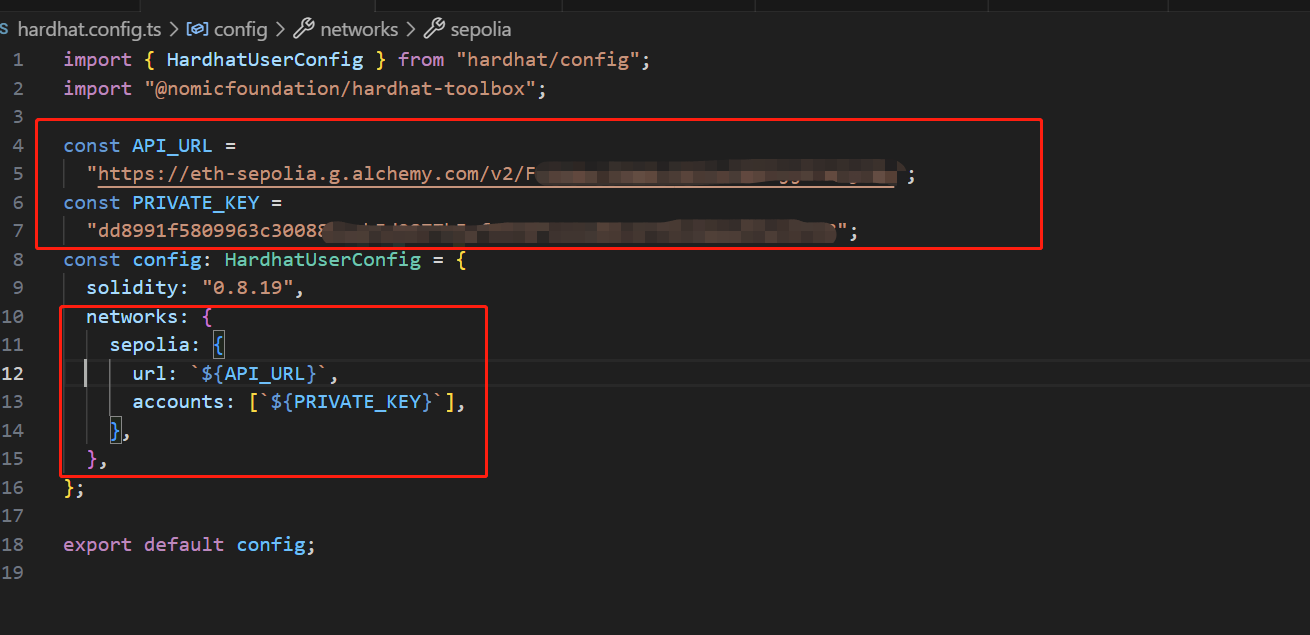 ,然后命令加上
--network sepolia即可与sepolia网络(或任何你配置的比如主网)进行交互
# 部署合约
部署合约
以前是有个scripts文件夹,通过运行里面的脚本部署,现在改为ignition文件下,并进行了模块化封装
npx hardhat ignition deploy ./ignition/modules/Lock.ts
# 开源合约
npx hardhat verify --contract contracts/Token.sol:Token --network sepolia 合约地址
- 可以指定某个合约
- 指定网络
- 需要配置etherscan的api key
import { HardhatUserConfig } from "hardhat/config";
import "@nomicfoundation/hardhat-toolbox";

//如果使用代理需要添加以下代码
const { ProxyAgent, setGlobalDispatcher } = require("undici");
const proxyAgent = new ProxyAgent('http://127.0.0.1:7890');
setGlobalDispatcher(proxyAgent);

//部署账号的私钥,建议放在.env文件里面,不要放在代码里面
const SEPOLIA_PRIVATE_KEY = "b6e0878b81793a40ac4e6a5c63022dbcc7a39b248a13078046d1da21a83f24e1";
//需要到主网申请API_KEY (https://etherscan.io/myapikey)
const ETHERSCAN_API_KEY = "1E6AX9AEU8EAGAQZYQBQUGZDADAWNKK2T9";

const config: HardhatUserConfig = {
  solidity: "0.8.24",
  networks: {
    sepolia: {
      url: `https://ethereum-sepolia.publicnode.com`,
      accounts: [SEPOLIA_PRIVATE_KEY]
    }
  },
  //必须要有
  etherscan: {
    apiKey: ETHERSCAN_API_KEY,
  },
  //Sourcify 是一个专门针对智能合约源码验证和审计的平台,旨在提高智能合约部署的透明度和安全性。
  sourcify: {
    enabled: false
  },
  mocha: {
    timeout: 6_000_000,
  },//开源超时时间
};

export default config;
# 使用步骤
npm init已废弃,最新使用npx hardhat init---------2024-12-28更新-------------npm install --save-dev hardhatnpx hardhat命令行中有提示,复制那行命令以安装hardhat-toolbox(更新日期:2024-06-04:最新版安装会提示是否安装toolbox,不再需要另外复制命令安装了)

contracts文件夹中写sol代码
npx hardhat compile会自动编译合约,生成下图圈红的文件夹及代码,主要是abi以及ethers对本地合约的一些方法封装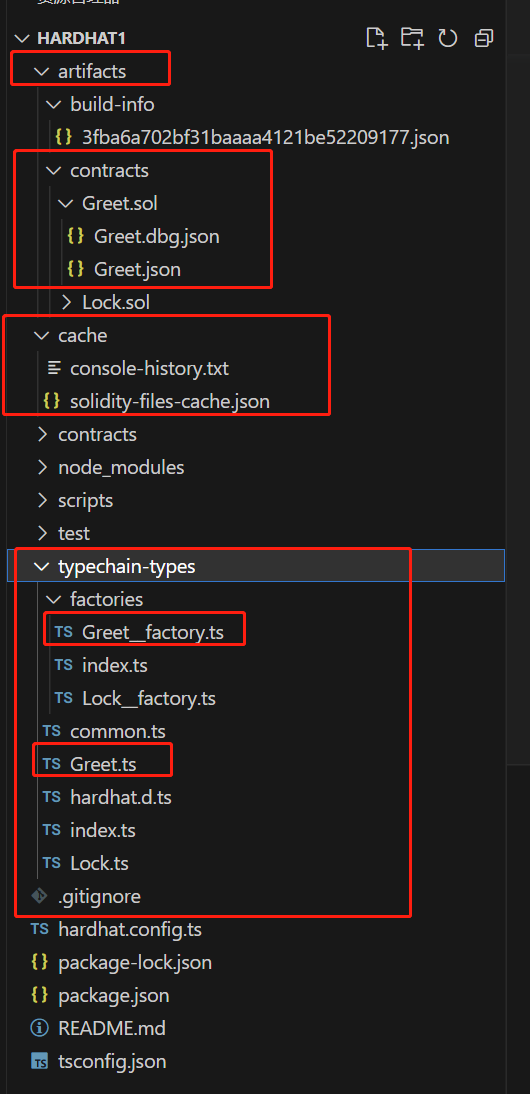
npx hardhat node- 开启本地节点,更方便持久化测试,不然直接test,run这些命令直接基于执行命令时在内存中创建的节点,命令执行完,节点生命周期也就完了
- fork主网
npx hardhat node --fork 'alchemy上的http链接',默认fork的是最新区块,之后的操作就和主网无关了 - 如果我们想每次
npx hardhat node命令直接fork主网,而不是每次命令都加上--fork参数,那我们需要在hardhat.config.js中做一些配置
const config: HardhatUserConfig = {
  solidity: "0.8.24",
  networks: {
    hardhat: {
      forking: {
          url: "",//alchemy上的http链接
          //blockNumber : 0//不填默认fork最新区块
      }
    },
    sepolia: {
      url: `https://ethereum-sepolia.publicnode.com`,
      accounts: [SEPOLIA_PRIVATE_KEY]
    }
  },
};
hardhat 的console功能,更方便调试
npx hardhat console --network localhostnpx hardhat run '脚本路径'可以运行本地编写的部署脚本npx hardhat test会自动运行test目录下的测试脚本,默认测试所有- 会自动编译
- 如果需要测试指定某个文件,
npx hardhat test ./test/mytoken.js
hardhat 的task可以将常用的脚本,比如获取账户余额等脚本功能写成hardhat的命令,方便复用,具体可以参考官网,我记得是随便写在一个文件里即可,但有固定格式,然后在hardhat.config,ts中引用下
除了在执行hardhat命令时 --network localhost,也可以通过在hardhat.config,ts中配置network,如下图:
,然后命令加上--network sepolia即可与sepolia网络(或任何你配置的比如主网)进行交互部署合约
以前是有个scripts文件夹,通过运行里面的脚本部署,现在改为ignition文件下,并进行了模块化封装
npx hardhat ignition deploy ./ignition/modules/Lock.ts
# 测试脚本
describe,it,expect,其中利用ethers的可以参考ethers v6那一章,遇到问题的话,可能是hardhat对ethers有一些封装,但大同小异
const { expect } = require("chai");

describe("测试任务1", function () {
  it("小任务1", async () => {
    //这里面正常使用ethers即可

  });

  it("小任务2", async () => {
    //1 .to.equal(value):检查实际值是否严格等于预期值。
    const result = await myInstance.totalSupply();
    expect(result).to.equal(1000); // 预期总量为1000

    //2 .to.not.equal(value):检查实际值是否不等于预期值。
    const balance = await myInstance.balanceOf(userAddress);
    expect(balance).to.not.equal(0); // 预期用户余额不为0

    //3 .to.deep.equal(object):深度比较两个对象是否相等。
    const eventResult = await myInstance.onTransfer((tx) => tx.wait());
    const expectedEvent = {
      from: '0x...',
      to: '0x...',
      amount: 123,
    };
	expect(eventResult.args).to.deep.equal(expectedEvent); // 预期事件参数与预期对象一致

    //4 .to.haveOwnProperty(propertyName):检查对象是否具有指定属性。
    const contractProperties = await myInstance.getProperties();
    expect(contractProperties).to.haveOwnProperty('name'); // 预期合约属性包含'name'

    //5 .to.be.gt(number) / .to.be.gte(number):检查数值是否大于(gt)或大于等于(gte)给定值。
    const blockNumber = await ethers.provider.getBlockNumber();
    expect(blockNumber).to.be.gt(100000); // 预期区块号大于100000

    //6 在Hardhat智能合约测试特有场景中:
    // 验证交易是否成功执行且未回滚
    await expect(myInstance.transfer(toAddress, amount)).to.emit(myInstance, 'Transfer') // 期待触发Transfer事件
      .withArgs(fromAddress, toAddress, amount); // 匹配事件参数

    // 验证函数调用是否回滚(即抛出异常)
    await expect(myInstance.unsafeWithdraw(amount)).to.be.revertedWith('Insufficient balance'); // 期待函数调用回滚并带有特定错误信息

    //这只是expect断言方法的一小部分,实际上它提供的方法远不止于此,还包括.to.throw(), .to.be.true(), .to.be.false(), .to.be.null(), .to.be.undefined()等等,用于满足不同类型的测试需求。
  });
});
# loadFixture
loadFixture 是 Hardhat 中的一个功能,通常用来在多个测试之间共享相同的初始化设置,这样可以避免每次测试都需要重新部署整个合约环境,从而提高测试效率。它主要用于加载固定的测试环境配置或创建一个可重用的“fixture”。
在Hardhat中,loadFixture 是通过 hardhat-deploy 插件或者其他类似的解决方案实现的。下面是一个基本的 loadFixture 使用示例:
// 引入chai和hardhat所需的模块
const {expect} = require("chai");
const {ethers} = require("hardhat");

// 引入hardhat-toolbox中的网络辅助工具
const {
    loadFixture,
} = require("@nomicfoundation/hardhat-toolbox/network-helpers");

/**
 * 部署GLDToken合约的函数。
 * 无参数。
 * 返回值:部署的GLDToken合约实例。
 */
async function deployMyContract() {
    // 获取GLDToken合约的工厂
    const factory = await ethers.getContractFactory("GLDToken");
    // 使用工厂部署GLDToken合约,初始化供应量为1000
    const token = await factory.deploy(1000);
    // 等待部署交易被确认
    const tx = await token.deploymentTransaction();
    // 等待交易收据
    const receipt = await tx.wait();
    return token;
}

// GLDToken合约的测试套件
describe("GLDToken", () => {
    // 在每个测试之前部署合约
    beforeEach(async () => {
        this.token = await loadFixture(deployMyContract);
    });

    // 测试:检查代币总供应量
    it("Token Supply", async () => {
        // 获取GLDToken的总供应量
        const totalSupply = await this.token.totalSupply();
        // 断言总供应量是否正确
        expect(totalSupply).to.equal(1000);
    });
});
# 开源合约
npx hardhat verify --contract contracts/Token.sol:Token --network sepolia 合约地址
- 可以指定某个合约
- 指定网络
- 需要配置etherscan的api key
import { HardhatUserConfig } from "hardhat/config";
import "@nomicfoundation/hardhat-toolbox";

//如果使用代理需要添加以下代码
const { ProxyAgent, setGlobalDispatcher } = require("undici");
const proxyAgent = new ProxyAgent('http://127.0.0.1:7890');
setGlobalDispatcher(proxyAgent);

//部署账号的私钥,建议放在.env文件里面,不要放在代码里面
const SEPOLIA_PRIVATE_KEY = "b6e0878b81793a40ac4e6a5c63022dbcc7a39b248a13078046d1da21a83f24e1";
//需要到主网申请API_KEY (https://etherscan.io/myapikey)
const ETHERSCAN_API_KEY = "1E6AX9AEU8EAGAQZYQBQUGZDADAWNKK2T9";

const config: HardhatUserConfig = {
  solidity: "0.8.24",
  networks: {
    sepolia: {
      url: `https://ethereum-sepolia.publicnode.com`,
      accounts: [SEPOLIA_PRIVATE_KEY]
    }
  },
  //必须要有
  etherscan: {
    apiKey: ETHERSCAN_API_KEY,
  },
  //Sourcify 是一个专门针对智能合约源码验证和审计的平台,旨在提高智能合约部署的透明度和安全性。
  sourcify: {
    enabled: false
  },
  mocha: {
    timeout: 6_000_000,
  },//开源超时时间
};

export default config;
# Helpers
# 模拟挖掘区块
const {ethers} = require("hardhat");
const {mine, mineUpTo} = require("@nomicfoundation/hardhat-toolbox/network-helpers");

describe("Help-Mine", function () {
    it("Mine", async function () {
        console.log(await ethers.provider.getBlockNumber());
        await mine();//挖掘一个区块
        await mine(40);//挖掘40个区块
        await mineUpTo(1000);//挖掘到1000个区块
        console.log(await ethers.provider.getBlockNumber());
    });
})
# 插槽
- getStorageAt(address, slot) 获取数据, address 合约地址,slot 插槽位置
- setStorageAt(address, solt, value) 修改数据, address 合约地址,slot 插槽位置, value 修改值
import {
    getStorageAt,
    setStorageAt
} from "@nomicfoundation/hardhat-toolbox/network-helpers";
import { expect } from "chai";
import hre from "hardhat";

//辅助工具
describe("Helper ", function () {
    //获取主网上USDT合约插槽数据
    describe("Mainnet USDT Storage", function () {
        const address = "0xdac17f958d2ee523a2206206994597c13d831ec7";
        //获取插槽
        it("Get Storage At", async function () {
            //owner
            const owner = await getStorageAt(address, 0);
            console.log(`owner: ${owner}`);
            //_totalSupply
            const totalSupply = await getStorageAt(address, 1);
            console.log(`totalSupply: ${totalSupply}`);
        });
    });

    //获取与修改本地Storage合约数据
    describe(" Local Storage", function () {
        const address = "0x54287AaB4D98eA51a3B1FBceE56dAf27E04a56A6";
        it("Set Storage At", async function () {
            //get number
            const number = await getStorageAt(address, 0);
            console.log(`number: ${number}`);
            //set number
            await setStorageAt(address, 0, 9);
            const numberAgain = await getStorageAt(address, 0);
            console.log(`number: ${numberAgain}`);
        });
    });
});
# 时间增量
时间与区块链密切相关,只能向未来进行修改,而无法改变过去
知识点:
- latest 获取最后区块时间
- increase(t) 修改未来时间, t 为正整数
- increaseTo(t) 修改到未来指定的时间, t 大于最后区块时间
const {ethers} = require("hardhat");
const {mine, mineUpTo, time} = require("@nomicfoundation/hardhat-toolbox/network-helpers");

describe("Help-Time", function () {
    it("Time", async function () {
        console.log(await time.latest());//跟区块绑定的,上一个区块的时间,没有新的区块产生就没有新时间
        // await mine();//挖掘一个区块
        await time.increase(100);//时间模拟增量100ms
        console.log(await time.latest());
    });
})
# 修改ETH余额
setBalance(address,amount)
import {setBalance} from "@nomicfoundation/hardhat-toolbox/network-helpers";
import hre from "hardhat";

//辅助工具
describe("Helper ", function () {
    //BIAN wallet  0xf977814e90da44bfa03b6295a0616a897441acec
    const ADDRESS = "0xf39Fd6e51aad88F6F4ce6aB8827279cffFb92266";
    //修ETH余额
    describe("ETH Balance", function () {
        //修改任意钱包地址 ETH 余额
        it("get and update eth balance", async function () {
            //获取余额
            const ethBalance = await hre.ethers.provider.getBalance(ADDRESS);
            console.log(`ETH balance : ${hre.ethers.formatUnits(ethBalance)}`);
            //修改余额
            const amount = "10";
            await setBalance(ADDRESS, hre.ethers.parseEther(amount));
            console.log(`Update address ${ADDRESS} balance to ${amount} ETH`);
            //再获取余额
            const ethBalance2 = await hre.ethers.provider.getBalance(ADDRESS);
            console.log(`ETH balance again : ${hre.ethers.formatUnits(ethBalance2)}`);
        });

    });
});
# 修改 Nonce 值
通过修改Nonce值,可以快速生成所需的交易签名。例如,假设账户A的Nonce为10,若A希望在Nonce达到100时发起交易,则只需将Nonce修改为100即可,无需连续进行90次交易以使Nonce达到100。
知识点:
- Nonce 是账户发起交易次数,可以通过getTransactionCount()方法获取
- Nonce 真实环境下不可修改,每交易1次,Nonce + 1
- 修改Nonce 值,setNonce(address,N) 只能修改大于当前的Nonce 值
import {setNonce} from "@nomicfoundation/hardhat-toolbox/network-helpers";
import hre from "hardhat";

//辅助工具
describe("Helper ", function () {
    //设置Nonce
    describe("Nonce", function () {
        //获取与设置 Nonce 值
        it("get and set nonce", async function () {
            const [sendAccount, toAccount] = await hre.ethers.getSigners();

            //根据地址获取nonce值
            const nonce1 = await hre.ethers.provider.getTransactionCount(sendAccount.address);
            console.log(`Address ${sendAccount.address} before nonce :${nonce1}`);
            //
            //发起 ETH 转账交易
            const amount = hre.ethers.parseUnits("1");
            let tx1 = { from: sendAccount, to: toAccount, value: amount };
            const responseTxETH = await sendAccount.sendTransaction(tx1);
            console.log(`Address ${sendAccount.address} tx nonce :${responseTxETH.nonce}`);
            await responseTxETH.wait();

            //根据地址再获取nonce值
            const nonce2 = await hre.ethers.provider.getTransactionCount(sendAccount.address);
            console.log(`Address ${sendAccount.address} after nonce :${nonce2}`);

            //修改nonce 值
            await setNonce(sendAccount.address,20);
            const nonce3 = await hre.ethers.provider.getTransactionCount(sendAccount.address);
            console.log(`Address ${sendAccount.address} update nonce :${nonce3}`);
        });
    });
});
# mempool 内存池
模拟主网内存交易池与失败交易
知识点:
- 默认环境下,hardhat 一个tx 产生 1个区块, 而且自动挖掘区块。所以,没有内存交易池
- hardhat.config.ts 配置内存池
- dropTransaction(hash)模拟失败交易 ,hash 为tx的hash,清空memepool里的这笔交易,主网是不行的,只能覆盖这笔交易
- provider.send("eth_getBlockByNumber", ["pending", false,]) 获取等待打包的区块
# hardhat.config.ts配置不自动挖掘
import { HardhatUserConfig } from "hardhat/config";
import "@nomicfoundation/hardhat-toolbox";

const config: HardhatUserConfig = {
  solidity: "0.8.24",
  networks: {
    hardhat: {
      mining: {
        auto: false,
        interval: 1000000//ms
      }
    }
  }
};

export default config;
# 代码
import { setNonce, dropTransaction } from "@nomicfoundation/hardhat-toolbox/network-helpers";
import hre from "hardhat";

//辅助工具
describe("Helper ", function () {
    //Mempool
    describe("Mempool", function () {
        //Mempool
        it("pending block and drop transaction", async function () {

            let start = new Date().getTime();
            const [sendAccount, toAccount] = await hre.ethers.getSigners();

            //发起 ETH 转账交易
            const amount = hre.ethers.parseUnits("1");
            let tx1 = { from: sendAccount, to: toAccount, value: amount };
            const responseTxETH = await sendAccount.sendTransaction(tx1);
            console.log(`responseTxETH :${JSON.stringify(responseTxETH)}`);
            //await responseTxETH.wait();

            //交易失败的原因可以是nonce 值错误,燃气不够,或其他原因导致
            await dropTransaction(responseTxETH.hash);//模拟交易失败,清空memepool里的这笔交易,主网是不行的,只能覆盖

            //获取pending block
            const pendingBlock = await hre.ethers.provider.send("eth_getBlockByNumber", ["pending", false,]);
            console.log(`pendingBlock:${JSON.stringify(pendingBlock)}`);

            //结束时间
            let end = new Date().getTime();
            //时间差
            console.log("Took times", end - start);
        });
    });
});
# 覆盖 Pending 交易
覆盖内存池里的 Pending 交易
知识点:
- 创建新的交易TX ,设置该TX的 nonce 为被覆盖的TX
- 每次增加小费(MaxPriorityFeePerGas )大于原来小费的10% ,而且 MaxPriorityFeePerGas < MaxFeePerGas
- 如果nonce 0 的交易pending中,后面又执行了nonce 1,nonce 2等交易,这些交易都不会成功,且查询pending交易,只会看到nonce 0 的那笔交易
import {setNonce,dropTransaction} from "@nomicfoundation/hardhat-toolbox/network-helpers";
import hre from "hardhat";
import { ethers, Wallet,  TransactionRequest, TransactionResponse, Block} from 'ethers';

//辅助工具
describe("Helper ", function () {

    //Mempool
    describe("Mempool", function () {
        //Pending
        it("Replace Pending TX", async function () {

            const [sendAccount, toAccount] = await hre.ethers.getSigners();

            //发起 ETH 转账交易
            const amount = hre.ethers.parseUnits("1");
            let tx1: TransactionRequest  = { from: sendAccount, to: toAccount, value: amount };
            const responseTxETH = await sendAccount.sendTransaction(tx1);
            console.log(`First Tx Nonce:${responseTxETH.nonce}`);
            console.log(`First Tx MaxFeePerGas :${responseTxETH.maxFeePerGas }`);
            console.log(`First Tx MaxPriorityFeePerGas  :${responseTxETH.maxPriorityFeePerGas }`);
            console.log(`First Tx Hash:${responseTxETH.hash}`);

            const amount2 = hre.ethers.parseUnits("10");
            let tx2: TransactionRequest  = { from: sendAccount, to: toAccount, value: amount2 };
            //tx2.nonce = 0;
            tx2.nonce = responseTxETH.nonce;

            //每次增加10%
            let iMaxPriorityFeePerGas = parseInt(responseTxETH.maxPriorityFeePerGas!.toString());
            iMaxPriorityFeePerGas = Math.ceil(iMaxPriorityFeePerGas * (1 + 0.1));
            const bMaxPriorityFeePerGas = ethers.parseUnits(iMaxPriorityFeePerGas.toString(), 'gwei');
            tx2.maxPriorityFeePerGas = bMaxPriorityFeePerGas;

            const responseTxETH2 = await sendAccount.sendTransaction(tx2);
            console.log(`Replace Tx Nonce:${responseTxETH2.nonce}`);
            console.log(`Replace Tx MaxFeePerGas :${responseTxETH2.maxFeePerGas }`);
            console.log(`Replace Tx MaxPriorityFeePerGas  :${responseTxETH2.maxPriorityFeePerGas }`);
            console.log(`Replace Tx Hash:${responseTxETH2.hash}`);


        });
    });
});